Bypassing the Sound Blaster's new firmware signature check
I recently demonstrated a few vulnerabilities in the Sound Blaster Katana V2/V2X/SE which allowed me to hijack the device over Bluetooth and turn it into an attacker-controlled keyboard peripheral, injecting keystrokes into the connected machine.
Creative recently published a new firmware (version 1.20.260617.1110) to address these issues. In this article, I take a deep dive into the changes and highlight why they're not sufficient to stop the same attack that I described.
CTP Bluetooth authentication
One of the flaws I highlighted in my previous post was that CTP, which the mobile and desktop applications use to communicate with the device, require no authentication to use over Bluetooth, which means any attacker can connect to the device over Bluetooth and start changing the device's settings or even upload malicious firmware to the device. What's worse is that Bluetooth was always enabled with no way to turn it off, even if the device is in sleep mode.
Creative addressed the last part of the issue: users can now turn BLE off by holding the Power and Mode buttons for two seconds, with the caveat that the Creative mobile app will no longer work. BLE is, however, enabled by default and this is not obvious in any way as there's no indication that Bluetooth is turned on or that you have to hold those two specific buttons unless you read the firmware release notes.
The unauthenticated protocol, however, was not addressed in any way. If BLE is enabled, anyone within Bluetooth range can still connect to the device and start issuing commands to the device.
Firmware signature checks
Another change that Creative made with this new firmware is the inclusion of a new CHK3 section in the firmware image.
The firmware already had CHK2, which was a SHA-256 checksum over the firmware payload body. This is essentially just an integrity check, but was otherwise easily patchable by any attacker after modifying the firmware.
The new CHK3, in turn, is an Ed25519 signature over that same hash. This provides authenticity, as the device now refuses to flash an update if the signature can't be verified against an embedded public key.
As a rough overview, the firmware container files now look like:
+0x00  "CIFF"
+0x04  u32 payload_size
+0x08  CINF, CIN2, DATA(FBOOT), DATA(FMAIN), DATA(Hres...), DATA(Hbin...)
       CHK2  = SHA-256 over [0x08 : CHK2]
       CHK3  = Ed25519 signature
When a firmware is uploaded to the device, the device performs the Ed25519 check over the payload as per the payload size. If it succeeds, it proceeds to flash the firmware itself.
I didn't see any obvious flaws with the signature check itself. I'm not a cryptography expert, but the implementation seems robust. As long as they keep the private keys used to sign the firmware secure, it shouldn't be possible to sign a new container with a fake signature.
A Tale of Two Parsers
The upgrade state machine (function around 0x4020a200) does two independent things to the firmware update: first, it checks the validity of the image by calculating its CHK2 and CHK3, and if it succeeds, it runs the extraction and flashing routine to actually flash the firmware to the device.
The problem is that these routines use different parsers for the firmware image. These parsers, unfortunately, disagree on where the firmware ends.
The verification routine does roughly the following:
- read 8 bytes, check magic
CIFF/CIFZand readpayload_size - SHA-256 the next
payload_sizebytes - read the CHK2 section at
payload_size + 8, compare its 32 bytes to the digest - seek to
payload_size + 48, require tagCHK3and length 0x40 and read the signature - reconstruct the XOR-obfuscated public key and call the Ed25519 verification routine
Importantly, every offset it touches is derived from payload_size, which itself is not even included in the signature. No part of the verification routine ever reads past payload_size + 0x30 + 0x48.
The firmware extraction and flashing routine, however, simply loops over the sections in the firmware image and handles each section in order. Rough pseudocode:
read 8-byte section header (magic, size)
if read == 0: stop // terminates at end-of-file
switch(magic):
  "DATA": flash() // name decides the target
  "CINF","CIN2","CODE","CENC","_PIC","EXEA": handle()
  default: seek(size, SEEK_CUR) // skip
advance to next header
The routine bounds nothing by payload_size. It walks the entire image, section-by-section, using each section's own size field until a read returns 0 meaning it has reached the end of the file.
As CHK2 and CHK3 are not in the recognized-magic list, it hits the default case, which simply seeks past them and keeps processing the following sections. This means that sections appended after the signature trailer are happily parsed and flashed.
For firmware sections (DATA serctions whose name starts with F), the name maps to a flash partition and the payload is written there via the partition store. There is no deduplication in the loop and the store is keyed by name. If two sections target the same partition, the last partition wins.
This means that all an attacker needs to do to produce a malicious firmware image is to take a legitimate firmware image with a valid signature and append a malicious firmware section (such as FMAIN) past the CHK2 and CHK3 sections. The CHK3 validator stops at the end of the legitimate CHK3 section, but the flasher itself keeps going and iterates over every section, including the appended malicious section.

Exploitation
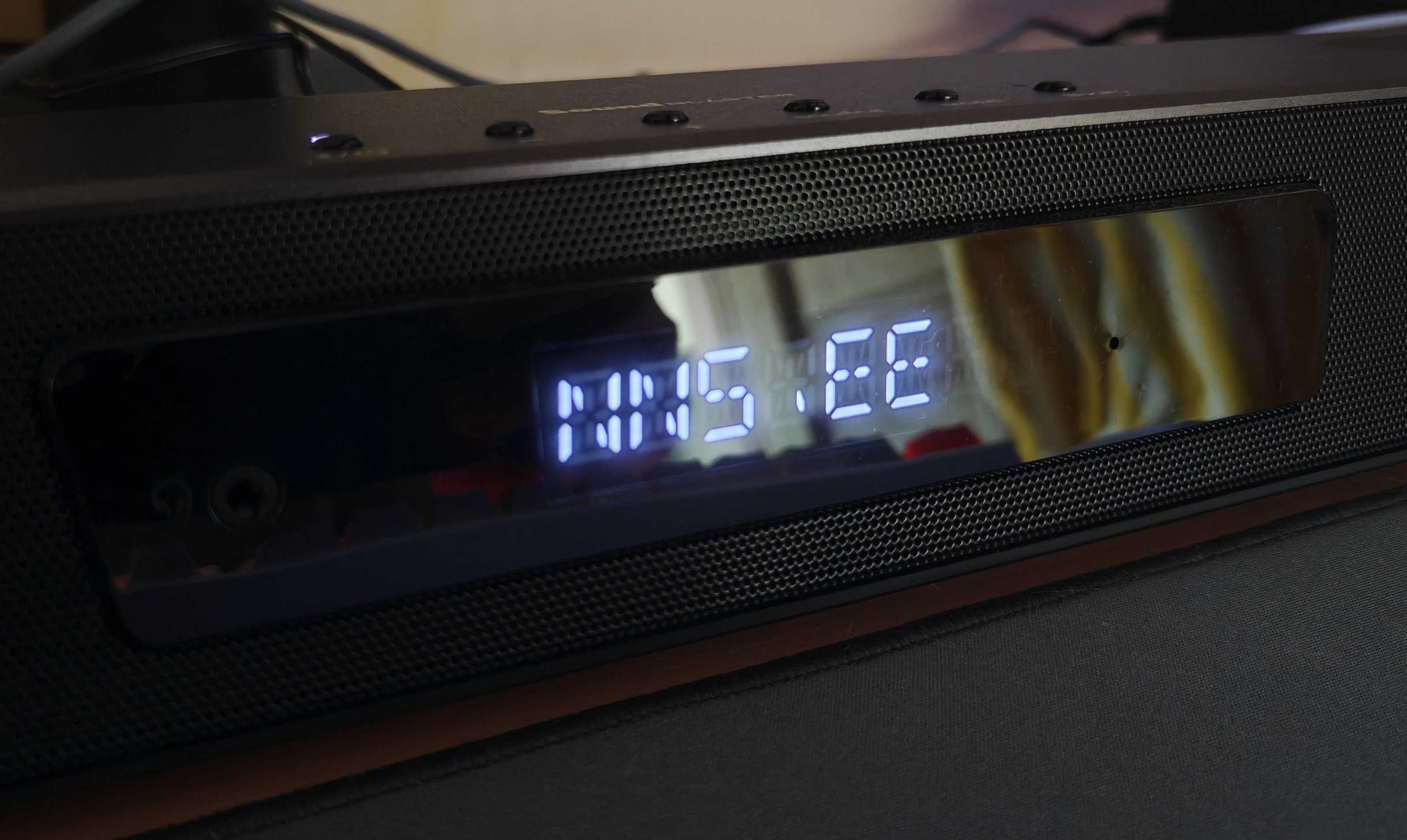
In order to test all of this, I decided to create a patched image based on the new firmware, this time replacing the text WELCOME shown on boot up (present in FMAIN) with my domain name nns.ee.
Creating a proof of concept firmware is incredibly easy. In Python:
data     = open("MF8400_fc00_2A534568.zif", "rb").read()
fmain    = data[0x37c44:0x1916b4]
modified = fmain.replace(b"WELCOME", b"NNS.EE ")

open("MF8400_fc00_welcome-PATCHED.zif", "wb").write(data + modified)
To flash this, I used the same proof-of-concept Bluetooth script that I used in my last post. No modifications were required.
After roughly ~10 minutes, the device rebooted successfully into my custom firmware despite the firmware signature checks:
2026-07-02 fix
Creative has released a new firmware version 1.21.260630.1200 which addresses the signature bypass with two separate fixes.
The first fix is that the Ed25519 verifier routine now checks whether the file has any extra bytes appended after the CHK3 section. Pseudocode:
// after reading CHK3 and validating the signature...
if (!ed25519_ok) valid = false;
else {
  n = read(&scratch, 1, ctx); // read one more byte past the CHK3 trailer
  valid = (n == 0);           // valid only if that read hit end-of-file
}
The second fix is in the firmware extractor itself, which now bounds every section to payload_size. While the previous version walked sections to EOF with no bound, the new firmware adds a tell() callback and refuses any section starting at or after payload_size+8.
From what I can tell, these fixes are sufficient in blocking the signature check bypass.
Creative has also noted that the CTP Bluetooth authentication fixes will be landing in future firmware updates.
2026-08-27 fix
Creative has released a new firmware version 1.30.260813.1100 which introduces a new BLE pairing method (requiring code confirmation and a physical button press) and has gated the CTP protocol behind this pairing.
The companion apps have been updated to make use of this new authentication protocol.
This makes it impossible for an unauthenticated attacker to send unauthenticated CTP commands over BLE and prevents the attacks described in this article and the previous article.
Timeline
- 25/06/2026 - Firmware version 1.20.260617.1110 released by vendor
- 26/06/2026 - Attempt to contact vendor and provide feedback on insufficient fixes
- 26/06/2026 - Vendor informs me of the updated version 1.20.260617.1110 simultaneously (emails sent ~30 seconds apart)
- 26/06/2026 - Vendor acknowledges the report
- 02/07/2026 - Firmware version 1.21.260630.1200 released by vendor
- 02/07/2026 - Vendor informs me of the updated version 1.21.260630.1200
- 02/07/2026 - Updated firmware version reviewed and fixes detailed in article
- 03/07/2026 - Write-up published
- 27/08/2026 - Firmware version 1.30.260813.1100 released by vendor
- 27/08/2026 - Vendor informs me of the updated version
- 28/08/2026 - Write-up updated with information on the new release